Help:EntropiaPlanets Wiki 101
Creating a new pages[edit]
The easiest way to create a new page is to simply replace the pagename in the address bar of your browser and hit "Enter".
Example: " http://www.entropiaplanets.com/wiki/Name of the new page "
To create specific pages with a form you have to enter the pagename in the according field to be found all over the wiki. Example: The field on Version Updates to create a page representing a Version Update.
Uploading files[edit]
Plain uploader[edit]
Good for single files, please click Special:Upload!
Ajax Uploader[edit]
Conveniently integrated in the regular editor, great for galleries. In editing mode look for this button in the editor toolbar: 
Adding images[edit]
...
Adding image galleries[edit]
<gallery>
File:Entropia Universe Port Atantis Harbour.jpg|PA
File:Monria appartments.jpg|[[Monria]]
</gallery>
is formatted as:
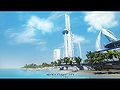
PA


More detailed info, options and examples: Help:Image galleries
Adding Youtube videos[edit]
- Syntax: {{Youtube|video_id}}
- Example: {{Youtube|1rV92K-QHjA}}
More options and examples: Help:Youtube
Adding lists[edit]
Bulleted[edit]
| What you type | What you get |
|---|---|
|
* Item 1 |
|
Numbered[edit]
| What you type | What you get |
|---|---|
|
# Item 1 |
|
Controlling Table Of Contents[edit]
To make the TOC appearing at the right border of the page add {{TOC|align=right}}.
-> Template:TOC
Adding tootips[edit]
Tooltips look like that: I'm a common tooltip. Or that: I'm a warning tooltip..
Clicking them opens a ballon with text.
| What you type | What you get |
|---|---|
| {{#info:I'm a common tooltip.}} | I'm a common tooltip. |
| {{#info:I'm a warning tooltip.|warning}} | I'm a warning tooltip. |